Fake payment screens
Code that can show a payment form that isn’t yours.
Why it mattersCustomers may type card details into an attacker’s form. You can still look “open for business” while fraud and chargebacks land on your store.
Early access
Watches your Shopify theme for checkout scams — before customers get burned.
Sketch Audit checks your live theme for signs someone may be trying to steal payment details at checkout. You get plain-language alerts, a dashboard history, and clear next steps — without needing to be a developer.
Automatic scans of your live theme while you focus on selling.
Know what looks wrong and what to do next — without digging through code.
Get notified when a scan finds a problem (optional digests if you want summaries).
Review recent scans, compare results, and share status with your team.
Run an extra check anytime — pick your published theme or a draft before you go live.
Opt-in text alerts when a problem is detected — so you’re not stuck in email.
We look for patterns that show up when attackers try to steal payment details on a Shopify storefront. Here’s what that means for you as a store owner — not a list of technical fingerprints.
Code that can show a payment form that isn’t yours.
Why it mattersCustomers may type card details into an attacker’s form. You can still look “open for business” while fraud and chargebacks land on your store.
Checkout clicks sent somewhere unexpected.
Why it mattersShoppers leave your trusted flow for a lookalike page. Cards and personal data can be stolen under your brand.
Theme code talking to odd or untrusted destinations.
Why it mattersAttackers often use those paths to load extra bad code or send stolen data out without you noticing.
JavaScript that behaves like it’s collecting payment info or hiding what it does.
Why it mattersSkimmers are designed to stay invisible — the storefront still looks normal while checkout is compromised.
Links and hosts already tied to malware campaigns.
Why it mattersIf your theme loads them, your store may already be part of an active attack.
Invisible frames or layers loading someone else’s page.
Why it mattersFake checkout or tracking can run on top of your store while customers think they’re still with you.
Layers that can cover checkout — especially ones with payment fields.
Why it mattersA full-screen fake form can sit over the real checkout so customers pay an attacker by mistake.
Tiny or unusual page elements used to sneak scripts in.
Why it mattersIt’s a common way infections hide so they last longer and keep stealing from customers.
Bottom line: if something real is flagged, customers can have cards stolen on your storefront — with fraud, chargebacks, and lost trust — even when the shop still looks fine. Sketch Audit is built to catch that class of problem early. It is not a general website or server security audit.
Install from the Shopify App Store, then pick a plan in the app. Billing runs through Shopify.
SMS is optional. Your phone carrier may charge for texts; Sketch Audit doesn’t add a per-message fee beyond your plan.
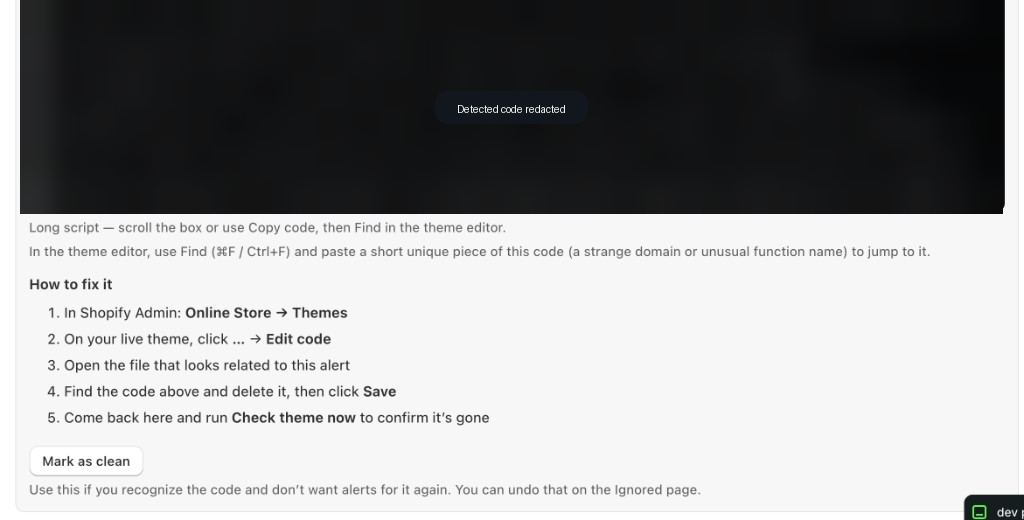
Every scan produces a report you can act on — even if you’re not a developer.
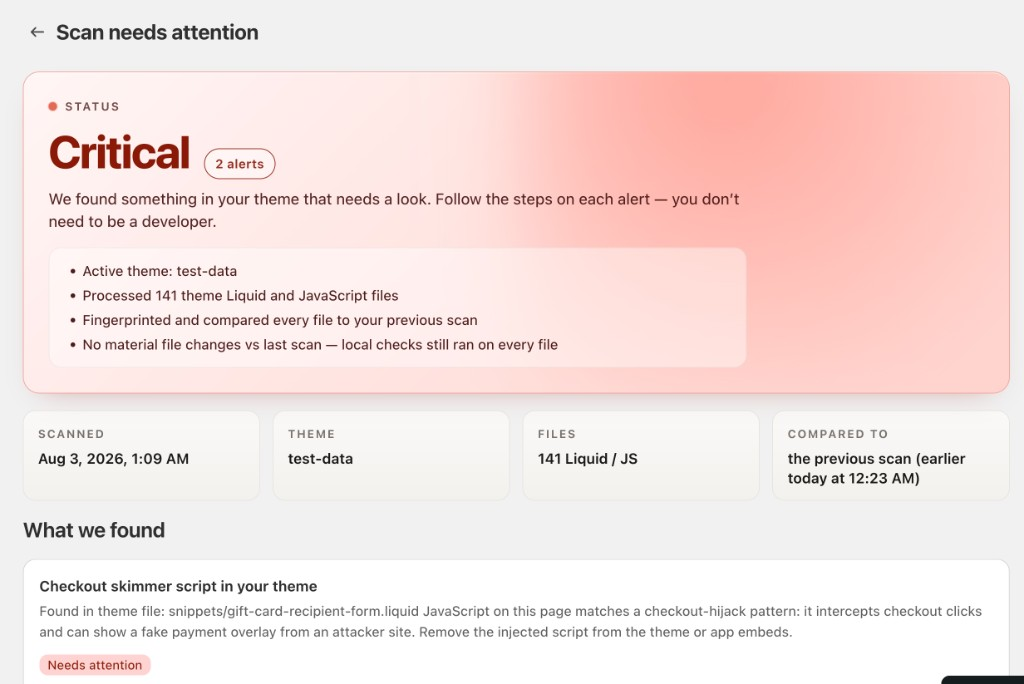
A plain verdict for the scan — for example that something needs attention — plus a short note you can follow without being a developer.
Which theme was active and how much of it we reviewed, so you know the result is based on real work — not a vague score.
Each alert names the issue in everyday language, where it showed up, and what to do next.
Step-by-step guidance through Shopify Admin so you can remove bad code or mark known-good pieces as clean.
Install Sketch Audit from the Shopify App Store, then pick Basic or Pro in the app.